Picking the right ad type in Google Ads can really change how your campaigns perform. One option a lot of people turn to is responsive display ads. These ads pull from the stuff you give them, like pictures, headlines, short lines, logos, sometimes videos, and Google figures out how to mix them up to fit wherever they show up, like on websites, apps, YouTube, or Gmail.
The big question people ask is: when should you use responsive display ads? That’s what I’ll cover here. I’ll explain what they are, why they work well in some cases, and when you might want something else instead. By the time you’re done reading, you’ll have a clearer idea if they’re right for what you’re trying to do.
What Responsive Display Ads Actually Are
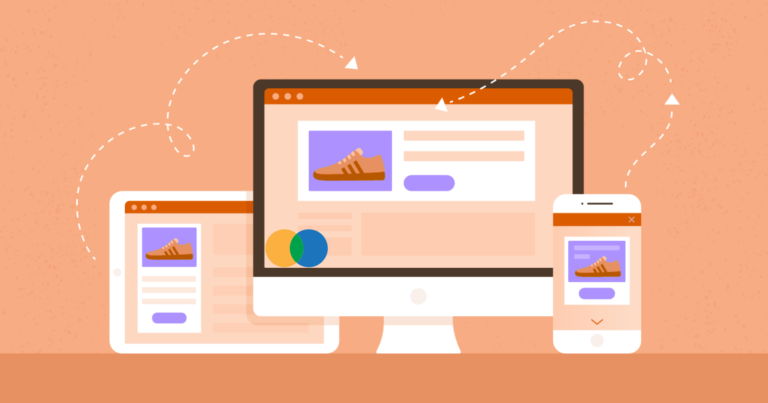
You hand over a bunch of pieces: up to 15 images, five headlines, five longer headlines, five descriptions, and logos. Google takes those and builds ads that change shape and style to match the spot they’re in on the Display Network. That network covers tons of sites and apps.
Back in the day, you’d have to build separate ads for every possible size. Now, these do the adjusting for you. Google’s system learns from what’s clicking and converting, then picks the best combos for each person seeing the ad.
It’s straightforward to set up, and it can get your message out to way more places.
Why People Like Using Them
Plenty of advertisers stick with these for good reasons:
- They show up in more spots because they fit all kinds of formats like banners, sidebars, and even look like part of the page.
- You save a bunch of time. Upload everything once, and let Google handle the variations.
- They often get better over time as the system tests what works and sticks with the winners.
- Great for pulling people back to your site by showing the exact products they checked out before.
- Videos or sharp images can grab attention more than plain stuff.
These perks make them a solid pick for many setups.
When Should You Use Responsive Display Ads? Times When They Really Pay Off
So, when should you use responsive display ads? Here are the spots where I’ve seen them work best:
- Getting Your Brand Out There
If you’re just trying to make more people familiar with your name or logo, these are handy. They pop up everywhere, building recognition without you having to fiddle with details.
- Bringing Back Website Visitors
Pair them with your product list for remarketing. People see the stuff they almost bought, and it feels personal. That nudge often turns browsers into buyers.
- When You Don’t Have a Design Team
If you’re running things solo or with a small group, no need for custom graphics in every size. Throw in decent photos and text, and you’re good.
- Trying Out Different Messages Fast
Give Google a mix of headlines and lines. It tests them live and tells you quickly what grabs people.
- Running on Phones, Tablets, and Computers
They switch seamlessly between devices, so your campaign hits everyone without extra work.
How They Stack Up Against Fixed Image Ads
To figure out when should you use responsive display ads, compare them to the old-school uploaded images.
With responsive ones, Google calls the shots on how things look together. You lose some say in the exact design. Fixed ads let you control every pixel and layout.
But responsive usually get seen more and clicked more because they fill odd spaces, fixed ones can’t. Fixed are better if your brand has super strict looks that can’t vary.
Go responsive for volume and simplicity. Stick with fixed when the visual has to be perfect every time.
Tips to Make Them Work Better
Want good results? Try this:
- Load as many pieces as you can with max out images, text options, logos in square and wide shapes.
- Pick clear, sharp photos that focus on what you’re selling. Skip cramming text on them.
- Mix up your headlines and descriptions. Some are short and punchy, others explain the deal.
- Throw in a video if you’ve got one.
- Watch Google’s rating for your ad. Add more variety until it says good or excellent.
- Look at the reports to see top-performing pieces, then add more like them.
Do that, and the system has plenty to play with for strong combos.
Situations Where You Might Skip Them
They’re not perfect for everything. Sometimes another type fits better:
- You Need Total Control Over the Look
If your brand guidelines are tight and every ad has to match exactly, go with fixed designs.
- Fancy or Interactive Stuff
For ads with moving parts or very specific setups, older formats like HTML5 might be the way.
- Tiny Budget Tests
If you’re spending little and not getting many views, the learning part might not kick in fast enough.
- Comparing Exact Designs
When you want to test two specific looks head-to-head, fixed ads make tracking cleaner.
In those cases, think twice before jumping to a response.
How to Jump In and Try Them
Want to give it a shot? In Google Ads:
- Start a Display campaign.
- Pick a responsive display ad.
- Upload all your assets.
- Check the previews of possible versions.
- Turn it on and keep an eye on how it’s doing.
Test small first. Make changes based on what the data says.
Final Thoughts!
Figuring out when should you use responsive display ads comes down to what you’re after, your time, and how much say you want in the design. They’re tough to beat for getting seen widely, setting up quickly, and improving on their own.
If you’re starting Display ads or want to grow without tons of work, give them a try. Feed them solid pieces, watch the reports, and adjust. They’re a reliable way to handle most Display needs these days.
FAQs
- What’s the biggest difference from regular image ads?
Responsive ones shift and combine your stuff automatically to fit more places, giving bigger reach but less hands-on design control. Regular images are set in stone, you make each size yourself for exact branding.
- How many pieces should I add?
Go for the limits: max images, headlines, descriptions, logos. The more options, the better Google can mix and match winners.
- Do they support videos?
Yeah, add one and Google might use it when it thinks it’ll perform better than a still image.
- Does it work for every goal?
Mostly yes. Awareness, pulling people back, and even sales. But if you need super precise looks or tight testing, fixed might edge them out.